Back to Nodes
Hailuo 2.3 Fast

Hailuo 2.3 Fast

Official

Fast Hailuo 2.3 for efficient image-to-video and text-to-video iteration.

Nodespell AI
AI / Video / Minimax

Fast Hailuo 2.3 for efficient image-to-video and text-to-video iteration.

Hailuo 2.3 Fast keeps the newer Hailuo behavior but favors quick turnaround. It accepts prompt and optional first frame, with duration, resolution, and prompt optimizer controls.

Use it when you need several motion directions before selecting one for a higher-detail pass.

Model Examples (1)

Example Index01 / 01
Example 01

Example 1

Source Inputs02
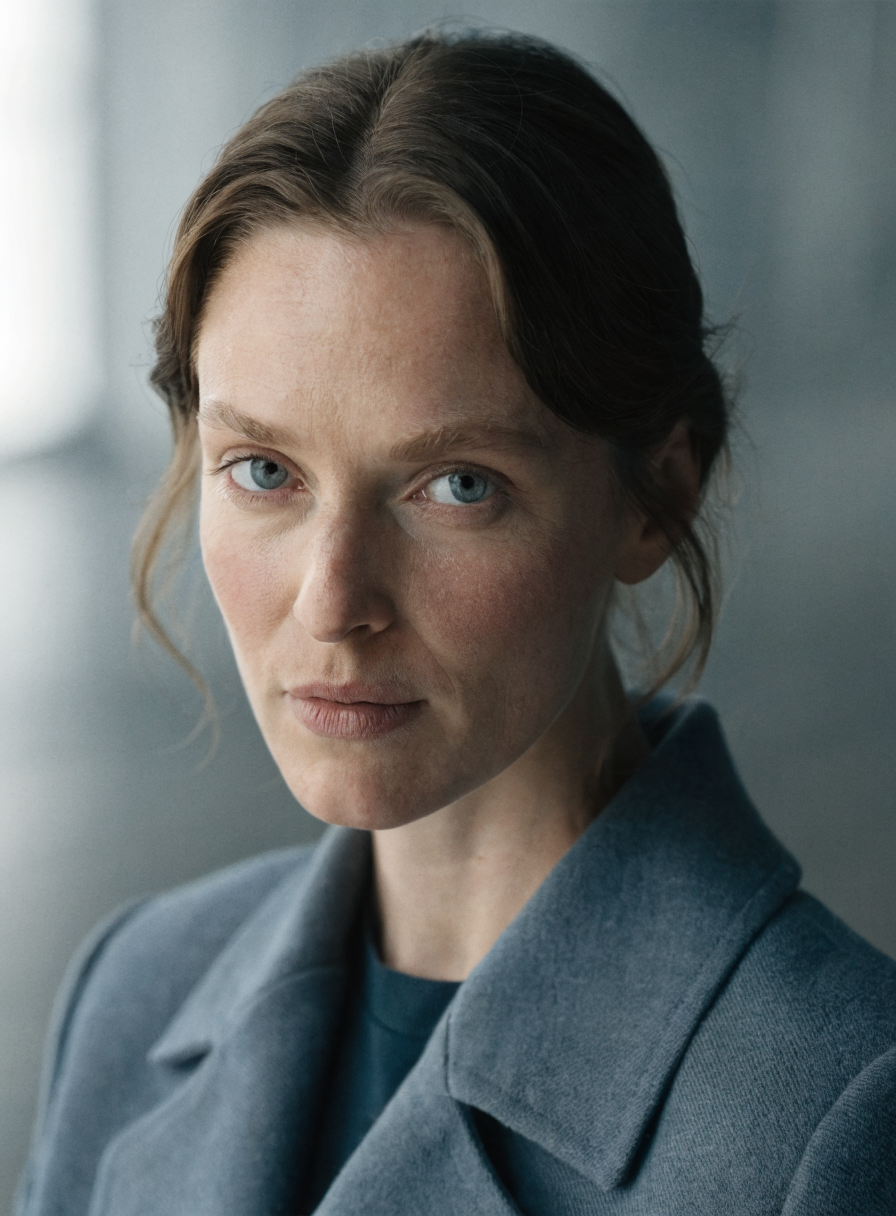
First Frame Image
Example input
Prompt

Subtle cinematic portrait motion: the character breathes naturally, eyes shift slightly toward camera, soft daylight changes across the face, background stays minimal, no exaggerated expression, no camera shake.

Parameters03
Duration
6
Resolution
768p
Prompt Optimizer
true
Image To VideoPortraitCharacterCinematic
Response
Inputs (2)

Prompt

String

Text prompt for generation

Multi InputMin: 0Max: 100

First Frame Image

String

First frame image for video generation. The output video will have the same aspect ratio as this image.

Min: 0Max: 100
Parameters (4)

Prompt

String

Text prompt for generation

Default:

Duration

Number

Duration of the video in seconds. 10 seconds is only available for 768p resolution.

Default: 6

Resolution

String

Pick between 768p or 1080p resolution. 1080p supports only 6-second duration.

Default: 768p

Prompt Optimizer

Boolean

Use prompt optimizer

Default: true
Outputs (1)

Output

Inferred

Output

Used in Workflows (2)

Short Film From Story Idea
Workflow
# Short Film From Story Idea ## Overview This workflow turns a raw story idea into a structured, AI-assisted short film package. It combines multi-step text generation and visual concept art so you can move from concept to shot-ready pre‑production in a single Nodespell graph. ## What You'll Build - A concise story breakdown with clear cinematic beats. - A 10‑shot film shot list derived from your short story. - Deeply refined descriptions for key shots (including shots #5 and #10). - High‑res character and scene reference images for visual development. ## How It Works 1. Your story idea or short story enters through multiple input nodes (23 inputs in total), feeding a complex graph of 52 nodes and 77 connections. 2. Fifteen **Gemini text** nodes, configured with the `gemini-2.5-flash` model (up to 3000 tokens for longer outputs), interpret the narrative, extract key beats, and transform the prose into a filmable structure. 3. Guided by embedded sticky note instructions, the workflow converts the narrative into a ~10‑shot list (e.g., the note that instructs: “Convert the short story into a shot list, roughly 10 shots in length”). 4. Dedicated refinement passes focus on pivotal moments: one set of Gemini text nodes expands shot #5, and another expands shot #10, adding detailed camera, performance, and environment notes suitable for directors and cinematographers. 5. Twelve **Seedream4** image nodes (configured at 2K, 2048×2048, 16:9, single-image output) use prompts such as the full‑body character portrait note to generate high-quality character and keyframe-style visuals. 6. A **hailuo23Fast** text node can provide additional fast drafting or alternate takes, giving you variation on dialogue, action, or pacing. ## Best For - Filmmakers and indie directors turning written ideas into ready-to-shoot plans. - Writers who want to visualize their short stories as films. - Storyboard artists and pre‑production teams needing structured shot lists and references. - Creators prototyping short films, teasers, or proof‑of‑concepts with AI. Try this snippet in Nodespell to turn your next story idea into a ready-to-shoot short film package.
NTNodespell Team
Recent
Fashion Print Design
Workflow
# Fashion Print Design ## Overview This Fashion Print Design workflow turns your fabric motifs and reference photos into production-ready dress visuals and motion previews. It combines multiple image models to apply prints to cotton garments with realistic studio lighting and consistent color. ## What You'll Build - High‑resolution **1:1 garment mockups** with your print applied across the full dress. - 2K **fabric texture tiles** suitable for textile sampling or e‑commerce. - Short **5‑second fashion clips** that showcase the dress and print in motion. - Iterative concept boards that stay aligned to your fashion print moodboard. ## How It Works 1. A moodboard image input (e.g., `fashion_print_moodboard`) anchors the overall style, palette, and motif direction. 2. Multiple **Seedream 4** nodes (25 total, key ones like `seedream9`, `seedream11`, `seedream13`) generate 2048×2048, 2K print swatches and fabric renders at a **1:1 aspect ratio**, optimized for color consistency where Nano Banana struggles with flower tones. 3. **googleNanoBanana** nodes (7 total, JPG output, 1:1) support fast ideation passes, while sticky notes guide prompts such as changing the dress material to match the reference and ensuring the print pattern wraps cleanly across the garment. 4. A dedicated instruction note drives photorealism: applying the print texture to **cotton fabric** under clear, realistic studio lighting. 5. **qwenImageEditPlus** and **qwenImage** refine fit, fabric details, and print placement, while **reveCreate** and `hailuo23Fast` assist with stylistic variations and composition. 6. **kling25ImageToVideo** nodes transform key frames into **5‑second videos** (CFG scale 0.5, negative prompt to avoid blur, distortion, and low quality), giving you animated fashion previews. ## Best For - Fashion and textile designers developing new print collections. - Apparel brands needing fast dress and fabric mockups from reference art. - Surface pattern designers pitching prints to clothing labels. - E‑commerce teams creating on‑model visuals and motion previews without a full photoshoot. - Creative studios prototyping AI‑assisted fashion print design workflows. Try this Fashion Print Design snippet in Nodespell to turn flat print references into polished, motion‑ready fashion visuals in a few guided steps.
NTNodespell Team
Recent

Nodespell Team

Creator profile

Type

Node

Status

Official

Package

Nodespell AI

Category

AI / Video / Minimax

Input

TextImage

Output

Video

Keywords

Video GenerationAspect ControlResolution Control
Use in Workflow