
Back to Nodes
Grok Imagine Reference To Video

Grok Imagine Reference To Video

Official

Grok Imagine reference-to-video guided by one or more images.

Nodespell AI
AI / Video / Xai

Grok Imagine reference-to-video guided by one or more images.

Grok Imagine R2V is the Grok node to choose when reference images should steer the generated video. It exposes prompt, reference images, aspect ratio, duration, and resolution.

Use it when the visual source material matters. Use the broader Grok video node for prompt-only, image-to-video, or video-editing inputs.

Model Examples (1)

Example Index01 / 01
Example 01

Example 1

Source Inputs02
Prompt

Use the reference image as visual guidance for an 8-second fantasy establishing shot: a slow low camera move through mossy stone arches, pale mist drifting over the reflecting pool, soft magical glow pulsing in the ruins, dawn light filtering through old trees, cinematic depth, no characters, no creatures, no readable text, no logos.

Reference Images
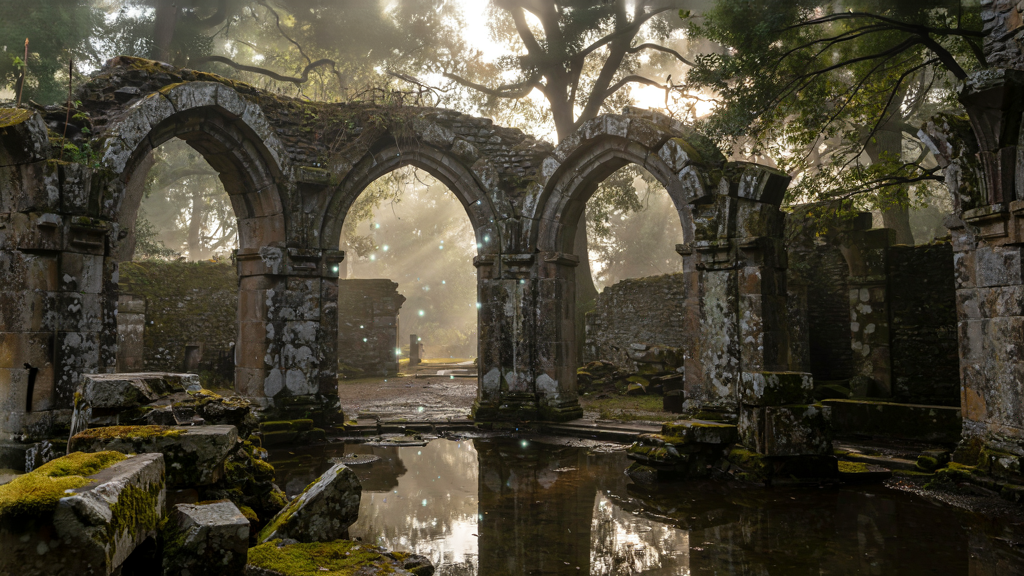
Example input
Parameters04
Prompt
Use the reference image as visual guidance for an 8-second fantasy establishing shot: a slow low camera move through mossy stone arches, pale mist drifting over the reflecting pool, soft magical glow pulsing in the ruins, dawn light filtering through old trees, cinematic depth, no characters, no creatures, no readable text, no logos.
Aspect Ratio
16:9
Duration
8
Resolution
480p
Reference To VideoFantasyEstablishing ShotSource Asset
Response
Inputs (2)

Prompt

String

Text prompt describing the video to generate.

RequiredMulti InputMin: 0Max: 100

Reference Images

String

Reference images used as style and content guidance.

RequiredMulti InputMin: 1Max: 7
Parameters (4)

Prompt

String

Text prompt describing the video to generate.

Required
Default:

Aspect Ratio

String

Aspect ratio of the generated video.

Default: 16:9

Duration

Number

Duration of the video in seconds.

Default: 8

Resolution

String

Resolution of the generated video.

Default: 480p
Outputs (1)

Output

Inferred

Generated video output.

Nodespell Team

Creator profile

Type

Node

Status

Official

Package

Nodespell AI

Category

AI / Video / Xai

Input

TextImage

Output

Video

Keywords

Video GenerationPrompt ConditioningConditional GenerationStyle Control
Use in Workflow